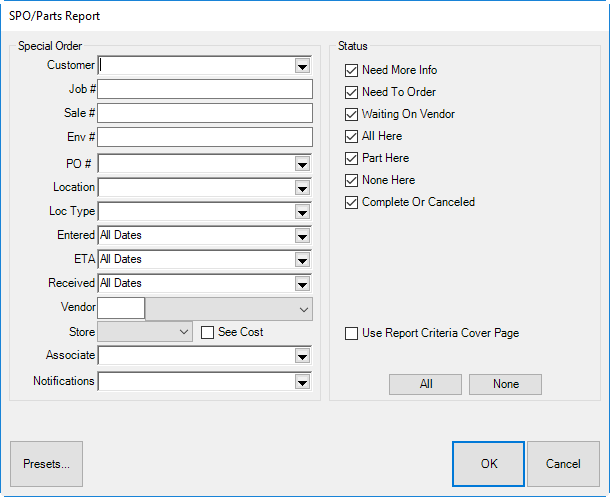
The SPO/Parts report is used to manage parts needed to fill repair jobs as well as custom-order and merchandise needed to complete special orders. The SPO/Parts report window allows you to narrow inclusion parameters much as you would for a special order search. For more information, see the section entitled Finding a Special Order Transaction.
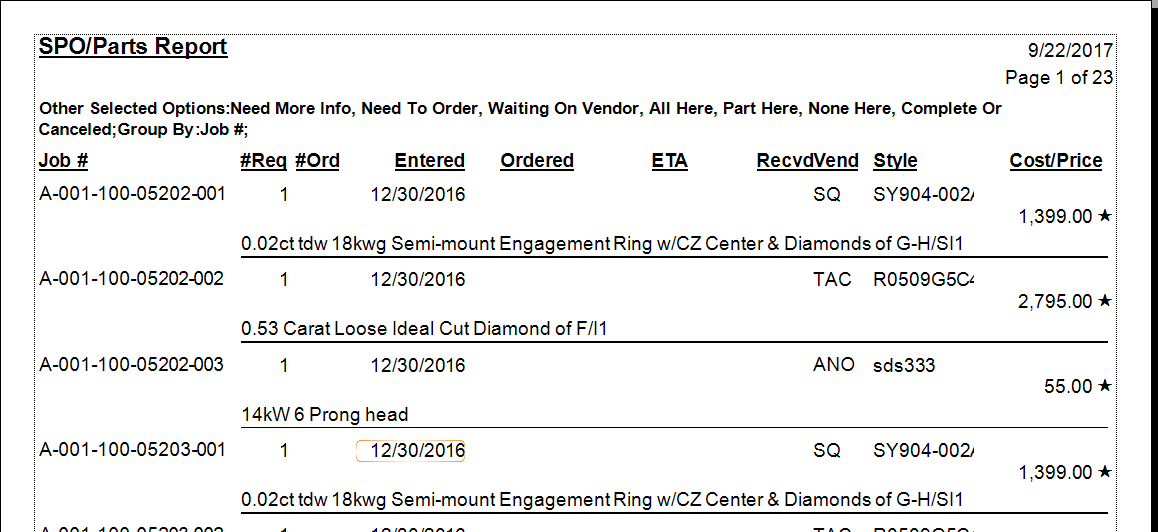
Data fields in the Special Order report include:
|
Job # |
The ID number for the special order. |
|
# Req |
The quantity of the item requested. |
|
#Ord |
The quantity of the item ordered. |
|
Entered |
Date the special order was created. |
|
Ordered |
Date the order was placed. |
|
ETA |
The estimated time (date) of arrival. |
|
Recvd |
The date the item was received. |
|
Vend |
The vendor ID. |
|
Style |
The vendor style number. |
|
Cost |
The cost of the item. |
|
Price |
The price to the customer. |
|
|
A star in the ETA field of the Special Order report indicates that the date and/or price is promised, not an estimate. |
