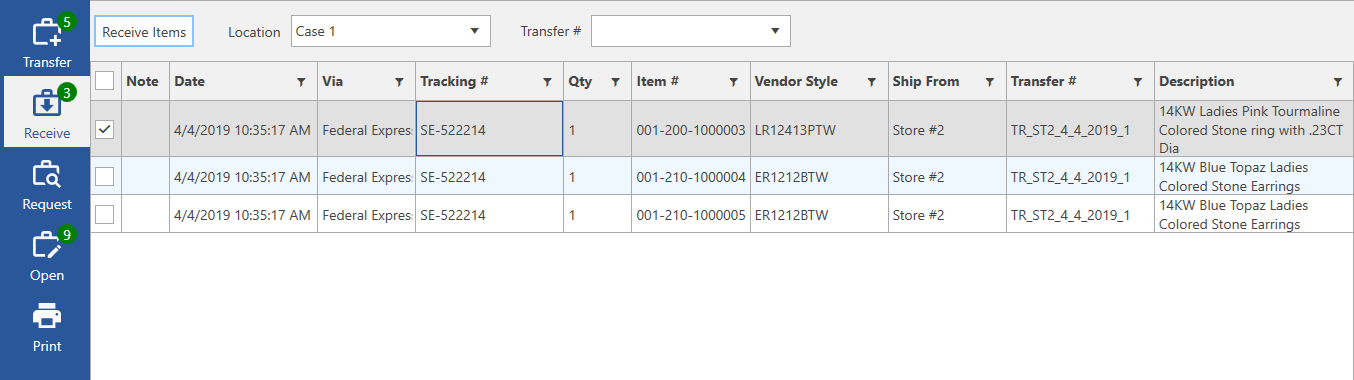
This tab opens a form showing all items transferred to your store that have not yet been received.
Fields and buttons include:
|
|
Click this to receive the currently checked items. |
|
Location |
Use this drop-down to select a case location to receive items into. The system option ‘Receive Items Requires Location’ can be used to make this required. |
|
Transfer # |
This drop-down will show open transfers waiting to be received. Selecting an open transfer will filter the list to only display items on that transfer. |
|
Note |
If there is a note on this transfer a green note icon will be displayed. Hover over the icon to review the note text. |
|
Date |
The date the item was originally transferred. |
|
Via |
The shipping method for this item. |
|
Tracking # |
The tracking number for this item. |
|
Qty |
The quantity of item transferred. |
|
Item # |
The item #. |
|
Vendor Style |
The item’s vendor style. |
|
Ship From |
The store where the item was transferred from. |
|
Transfer # |
The transfer # this item is assigned to. |
|
Description |
The description of this item. |
