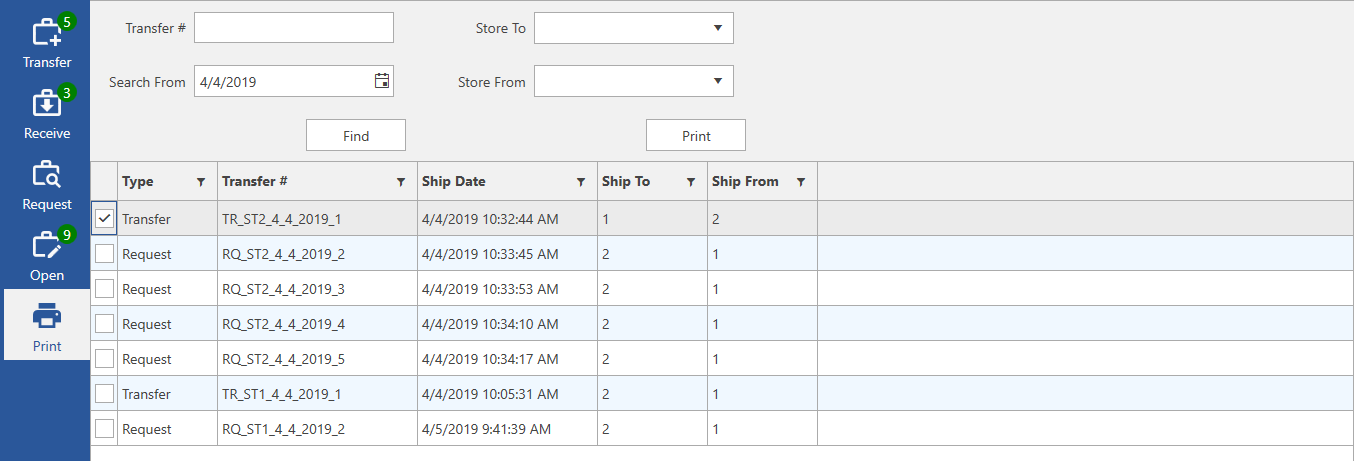
This tab is used to print transfers. Each printed transfer will show shipping information as well as a list of all included items.
Fields and buttons include:
|
Transfer # |
Enter a transfer # and click Find to search for it. |
|
Store To |
Choose a store # to filter Find results by store being shipped to. |
|
Search From |
Choose a date to filter Find results by shipped date. |
|
Store From |
Choose a store # to filter Find results by store being shipped from. |
|
|
After entering criteria, click this button to find matching transfers. |
|
|
After selecting a transfer, click this button to open the print preview. |
|
Type |
Specifies whether this is a transfer or request. |
|
Transfer # |
The transfer #. |
|
Ship Date |
The date this transfer was shipped. |
|
Ship To |
The destination store for this transfer or request. |
|
Ship From |
The originating store for this transfer or request. |