If you are importing changes to existing customers the import file must include the Edge customer number. Any records missing an Edge customer number will be imported as new customers.
The Customer Import Wizard can be used to import customers into the Edge. It supports importing new customers or importing changes to existing customers. Supported file formats include CSV, JSON, and XML.
|
|
If you are importing changes to existing customers the import file must include the Edge customer number. Any records missing an Edge customer number will be imported as new customers. |
|
|
The importer does not support deleting or merging customers. This type of cleanup must be done from within the Edge. |
To import customers using the wizard:
 |
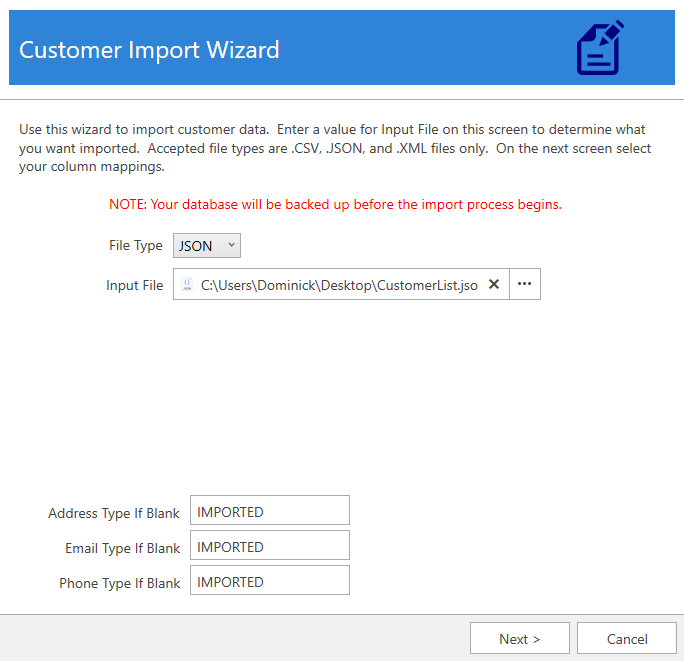
2. Select the File Type you wish to import, then use the Input File field to select the file for import.
3. In the Edge, each customer contact method (address, email, phone) has a type. For example, phone contacts might be type ‘Cell’, ‘Home’, ‘Work’, etc. If your import file contains contacts that do not have a type, the values at the bottom of this window will be used (default ‘Imported’).
4. Click Next to proceed.
5.
|
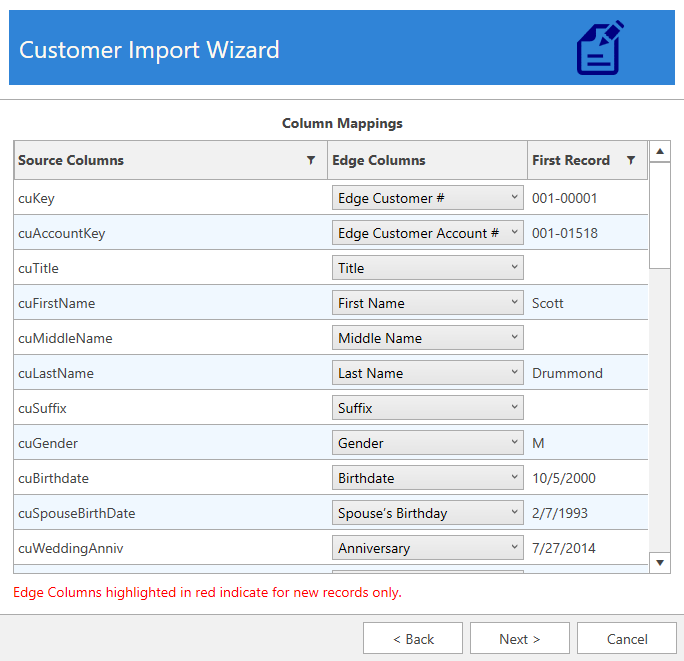
6. Complete data mapping then click Next.
7. Check whether you want to Show Updated/Imported Customer List, then click Next to perform the import. A backup of the database is automatically made at this time. Depending on the number of imported files, this could take some time to complete.
8. When completed the wizard will indicate the number of files processed and provide the path to the import log file.